
Getting started with Fabric
A hands-on starter kit for running a live beckn network in your own environment within 10 minutes — complete with a consumer node, a provider node, and the Fabric services that tie them together. No prior beckn experience needed.
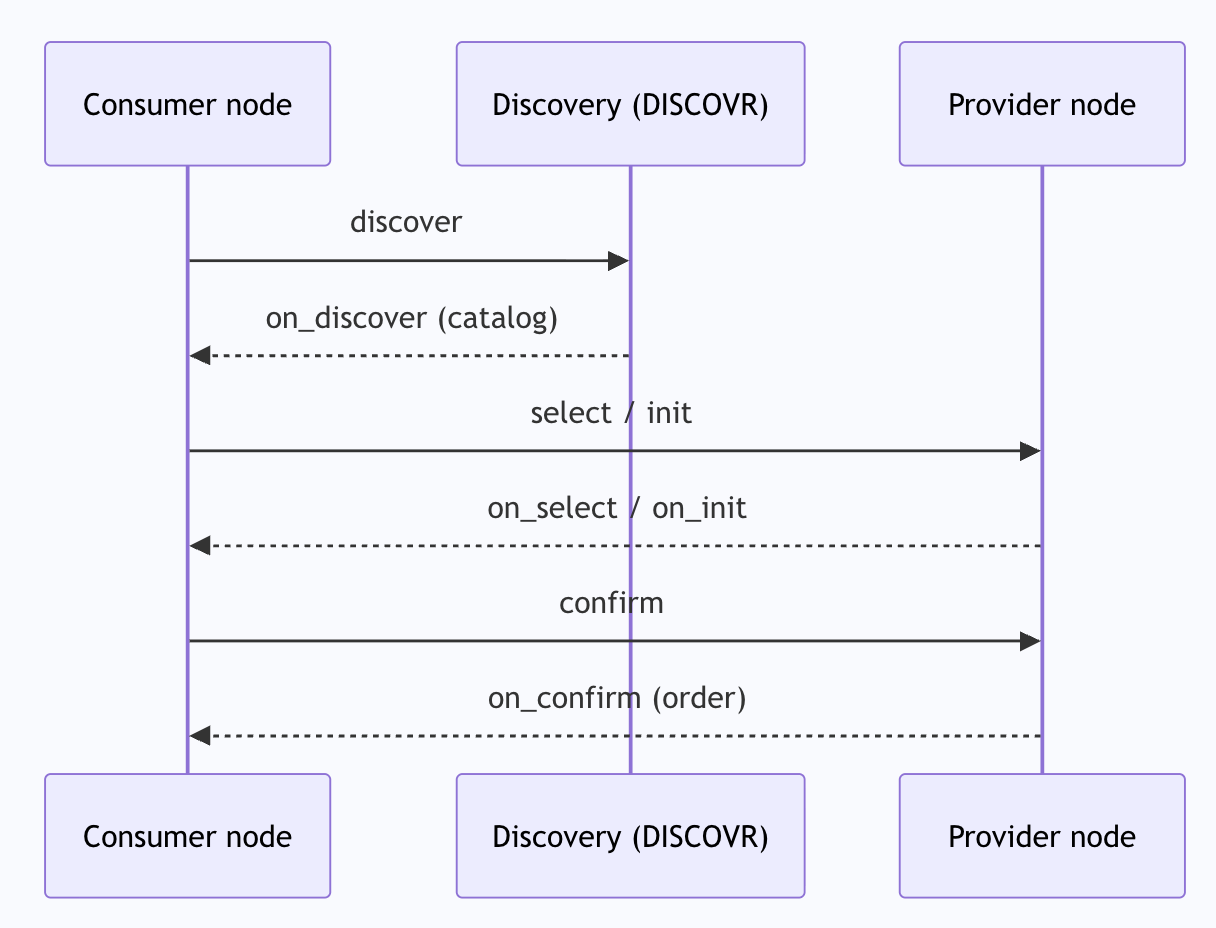
What Will You Learn?
By the end of this guide you will have:
A running beckn network — a Consumer Node (consumer-side platform), a Provider Node (provider-side platform), and the ONIX adapters that connect them, all running in your own environment, local or cloud. You will also see how the Discovery Service serves
discoverrequests from Consumer nodes.A working understanding of Fabric services — specifically how the DeDi Registry is used for identity and routing, and how the Catalog Service lets a Provider node publish its offerings.
An observable transaction flow — you will fire real beckn API calls, see the messages get signed and routed, and watch the full
discover → select → init → confirmlifecycle play out end-to-end.
What is Fabric? — A Quick Recap
Fabric is an open protocol that allows any buyer-side application to transact with any provider-side application across an open network — without either side being locked into a single platform. Think of it like HTTP for transactions: as long as both sides speak the beckn protocol, they can discover each other, negotiate, and transact, regardless of who built them.
Every beckn network has two kinds of application participants:
Consumer Node — the consumer side. A consumer node initiates transactions by sending actions:
discover,select,init,confirm, and so on.Provider Node — the provider side. A provider node responds asynchronously:
on_discover,on_select,on_init,on_confirm, and so on.
These two sides need not talk to each other directly. Every message travels through ONIX adapters — middleware that handles digital signing, schema validation, and protocol-level routing. It can also support observability at the network level, business policy enforcement, and much more. This keeps your application code focused on business logic.
Underpinning the whole network are Fabric services — shared infrastructure that every participant relies on. This starter kit uses two Fabric services: the DeDi Registry (for identity and routing lookups) and the Catalog Service (for publishing offerings). These are covered in detail in Fabric: Registry and Catalog Service.
Prerequisites
Ensure the following tools are installed before you begin:
Git — to clone this repository
Docker and Docker Compose
Docker Compose ships with Docker Desktop; for Linux see the Compose plugin guide
Postman — to send test requests
For cloud VPS deployment you additionally need SSH access to a Linux server (Ubuntu 22.04 recommended) with ports 8081 and 8082 open in your firewall.
Quick Start: Run the Network Locally
This is the fastest way to see a beckn network in action. Five Docker containers — two adapters, two application simulators, and Redis — start up on your laptop and form a complete, working network.
Step 1 — Clone the repository
git clone https://github.com/beckn/starter-kit.git
cd starter-kit/generic-devkit/install
Step 2 — Start the stack
docker compose -f docker-compose-generic.yml up
The first run pulls the required Docker images. This takes a few minutes once; subsequent starts are fast.
Step 3 — Confirm all services are healthy
docker compose -f docker-compose-generic.yml ps
Wait until all five containers show running or healthy:
Service | Port | Status to expect |
|---|---|---|
redis | 6379 | healthy |
onix-bap | 8081 | running |
onix-bpp | 8082 | running |
app-bap | 3001 | healthy |
app-bpp | 3002 | healthy |
Step 4 — (Optional) Watch the adapters in real time
Open a second terminal and tail the adapter logs while you send requests:
docker compose -f docker-compose-generic.yml logs -f onix-bap onix-bpp
You will see each message being signed, validated, and routed as you work through the transaction steps.
Stopping the stack
docker compose -f docker-compose-generic.yml down
Deployment: Cloud VPS
The same Docker Compose file works on any Linux VPS. Follow these steps after provisioning your server.
Recommended server spec: 2 GB RAM, Ubuntu 22.04.
Firewall — open these ports:
Port | Purpose |
|---|---|
22 | SSH |
8081 | onix-bap (consumer node ONIX adapter) |
8082 | onix-bpp (provider node ONIX adapter) |
3001 | app-bap (optional — for direct application access) |
3002 | app-bpp (optional) |
Install Docker on the server:
ssh user@your-server-ip

curl -fsSL https://get.docker.com | sh
sudo usermod -aG docker $USER
newgrp docker
Clone and start:
git clone https://github.com/beckn/starter-kit.git
cd starter-kit/generic-devkit/install
docker compose -f docker-compose-generic.yml up -d
The -d flag runs the stack in the background. Verify with:
docker compose -f docker-compose-generic.yml ps
docker compose -f docker-compose-generic.yml logs --tail=50
Make the stack survive reboots:
The onix-bap and onix-bpp containers already have restart: unless-stopped in the compose file. Redis and the application containers will also restart automatically once you add that policy. Run up -d again after any changes to the compose file.
Using a domain name and TLS:
For a production-like setup, place a reverse proxy in front of the adapters. Example with Caddy (auto-TLS via Let's Encrypt):
bap.yourdomain.com {
    reverse_proxy localhost:8081
}

bpp.yourdomain.com {
    reverse_proxy localhost:8082
}
Once your domain is live, update the routing configs (generic-routing-BAPReceiver.yaml and generic-routing-BPPCaller.yaml) with the public URLs, and register your participant with the Fabric testnet registry (see Customising the Starter Kit).
Your First Transaction
With the stack running, import the Postman collections and walk through a complete beckn transaction.
Import the collections
Open Postman and click Import.
Navigate to
starter-kit/generic-devkit/postman/.Import both files:
BAPBecknStarterKit.postman_collection.json— the buyer sideBPPBecknStarterKit.postman_collection.json— the provider side
Set the collection variables
Each collection has a bap_adapter_url / bpp_adapter_url variable that tells Postman where the ONIX adapters are reachable. For local deployment:
bap_adapter_url→http://localhost:8081/bap/callerbpp_adapter_url→http://localhost:8082/bpp/caller
For a VPS, replace localhost with your server's IP or domain.
Run in this order
The two collections together cover everything a consumer node and a provider node need to do. Run them in this sequence:
[BPP] publish         ← BPP registers its catalog with the Catalog Service
[BAP] discover        ← BAP queries the Discovery Service for available offerings
[BAP] select          ← BAP selects a specific offering
[BAP] init            ← BAP initiates the order
[BAP] confirm         ← BAP confirms the transaction
The on_* callbacks (on_discover, on_select, on_init, on_confirm) are sent asynchronously by the network and received automatically by the applications — you do not need to trigger them manually. The provider node collection also contains on_select, on_init, and on_confirm requests if you want to simulate or inspect the provider node responses manually.
After each step, check the onix-bap and onix-bpp logs to see the message being processed.
How It All Works
Now that you have seen the network in action, here is a deeper look at how the pieces fit together.
The Services in This Stack
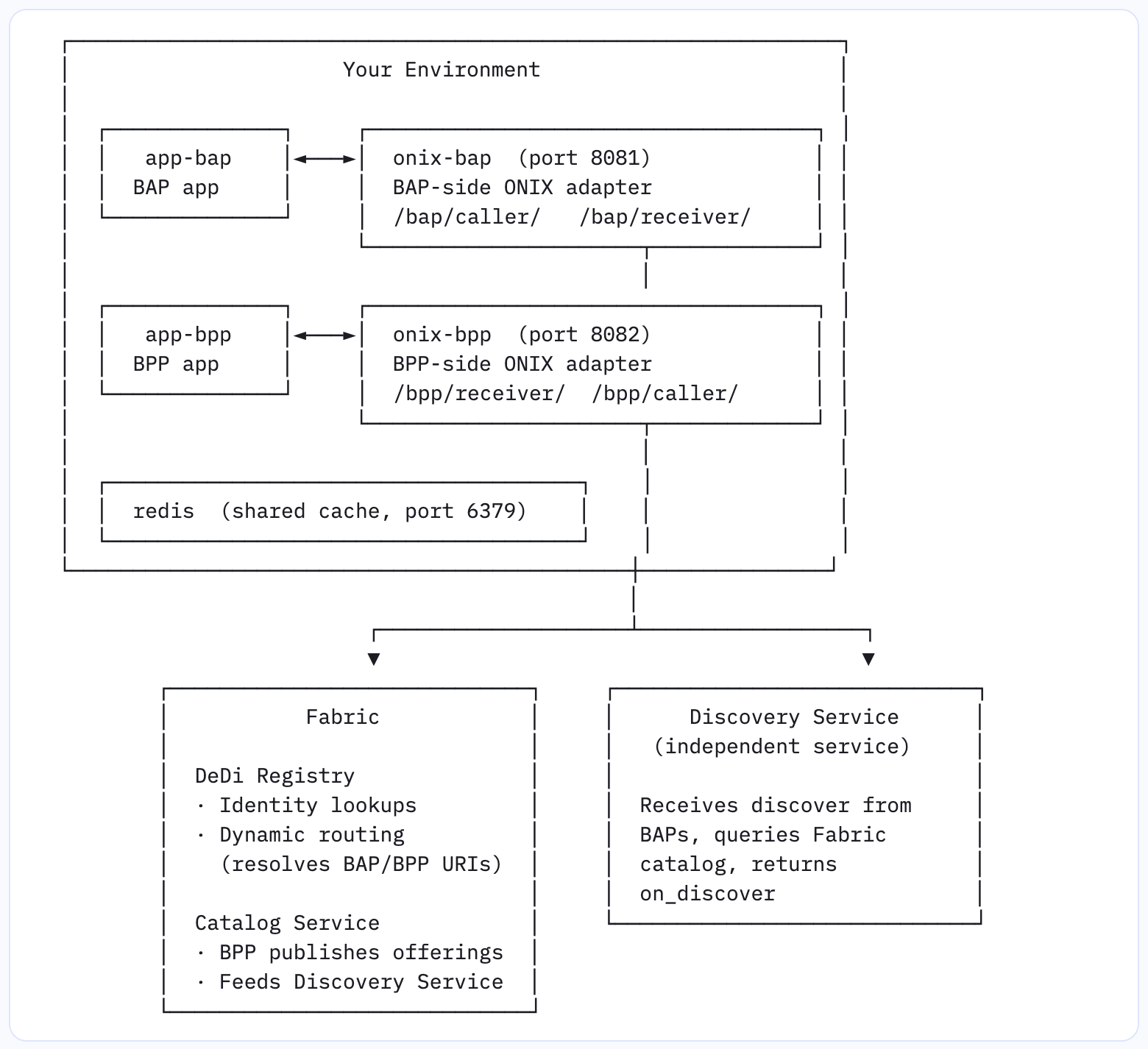
Service | Image | Port | Role |
|---|---|---|---|
onix-bap | fidedocker/onix-adapter | 8081 | consumer node-side protocol adapter |
onix-bpp | fidedocker/onix-adapter | 8082 | provider node-side protocol adapter |
app-bap | fidedocker/sandbox-2.0 | 3001 | Simulates a consumer node application |
app-bpp | fidedocker/sandbox-2.0 | 3002 | Simulates a provider node application |
redis | redis:alpine | 6379 | Shared request/response cache |
The ONIX adapter (fidedocker/onix-adapter) is the core middleware from the beckn-onix project. It is a plugin-based Go server that handles signing, signature validation, schema validation, and routing for every beckn message. Both onix-bap and onix-bpp run the same binary — their behaviour is entirely determined by their config files.
The application simulator (fidedocker/sandbox-2.0) is a generic beckn application simulator. It exposes simple HTTP endpoints that receive forwarded messages and generate appropriate responses, so you can observe the full protocol flow without building your own Consumer node or Provider node app yet.
Fabric: Registry and Catalog Service
Fabric is the shared infrastructure layer that makes an open beckn network possible. Without Fabric, each participant would need bilateral agreements with every other participant. Fabric removes that requirement by providing shared, trustless services that the whole network relies on.
This starter kit uses two Fabric services, both hosted at fabric.nfh.global, plus an independent Discovery Service that runs alongside but outside of Fabric:
DeDi Registry (fabric.nfh.global/registry/dedi)
The DeDi (Decentralised Discovery) Registry is the source of truth for participant identity on the network. Every Consumer node and Provider node registers their network ID, public key, and callback URI with the registry. The ONIX adapter consults the registry for two things:
Signature validation — when an inbound message arrives, the adapter looks up the sender's public key in the registry to verify the digital signature. If the key is not found or the signature is invalid, the message is rejected.
Routing — when a message needs to reach a Provider node (e.g.,
select) or return to a Consumer node (e.g.,on_select), the adapter performs a registry lookup by participant ID to resolve the correct callback URL. This is how the network routes messages without any static config between participants.
The registry is referenced in all four adapter config files under the registry plugin:
registry:
  id: dediregistry
  config:
    url: https://fabric.nfh.global/registry/dedi
    registryName: subscribers.beckn.one
Catalog Service (fabric.nfh.global/beckn/catalog)
The Catalog Service is where Provider nodes publish their offerings. When a Provider node calls publish (via onix-bpp), the adapter signs the message and forwards it to the Catalog Service. The Catalog Service stores the offering and responds with an on_publish callback to the Provider node. This is how a Provider node makes its catalog available for discovery without needing a direct connection to any Consumer node.
The Catalog Service endpoint is configured in generic-routing-BPPCaller.yaml:
target:
  url: "https://fabric.nfh.global/beckn/catalog"
endpoints:
  - publish
Discovery Service (<discovery-service>)
The Discovery Service is an independent network service — not part of Fabric — that acts as the search engine for the network. It queries the catalogs that Provider nodes have published to the Fabric Catalog Service and serves matching results to Consumer nodes. When a Consumer node sends a discover request, the adapter routes it to the Discovery Service, which responds asynchronously with an on_discover callback. The Consumer node never contacts a Provider node directly during discovery — direct Consumer-to-Provider communication only begins at select.
The Discovery Service endpoint is configured in generic-routing-BAPCaller.yaml:
target:
  url: "https://<discovery-service>/beckn"
endpoints:
  - discover
The Full Transaction Flow
Here is the complete picture of how a beckn transaction flows through the network, showing the correct roles of the two Fabric services and the Discovery Service:
Provider node side — catalog setup (happens before any Consumer node transaction)
─────────────────────────────────────────────────────────────────

app-bpp ──publish──► onix-bpp ──publish──► Catalog Service (Fabric)
                                                    │
app-bpp ◄──on_publish── onix-bpp ◄──on_publish─────┘
(catalog accepted; BPP offerings are now discoverable)


BAP side — discovery
─────────────────────────────────────────────────────────────────

app-bap ──discover──► onix-bap ──discover──► Discovery Service
                                                    │
                                     (queries Fabric catalog)
                                                    │
app-bap ◄──on_discover── onix-bap ◄──on_discover───┘
(BAP receives list of matching offerings)


BAP ↔ BPP — transaction (select / init / confirm)
─────────────────────────────────────────────────────────────────

app-bap ──select──► onix-bap
                        │ DeDi Registry resolves BPP URI
                        ▼
                    onix-bpp ──► app-bpp
                        │
                    app-bpp sends on_select response
                        │
                    onix-bpp
                        │ DeDi Registry resolves BAP URI
                        ▼
app-bap ◄──on_select── onix-bap

     ... same pattern repeats for init / confirm ...
The key insight: discovery always goes through the Discovery Service (consumer node → Discovery Service), and post-discovery transactions flow directly between consumer node and provider node with the DeDi Registry providing dynamic routing. The provider node also uses Fabric to publish its catalog before any discovery can happen.
Tracing a Request End-to-End
Here is the step-by-step journey of a single discover call, showing what happens inside each service:
1. Postman → onix-bap You trigger a discover by POSTing to onix-bap's caller endpoint (/bap/caller/discover). The bapTxnCaller module picks it up.
2. addRoute — the adapter reads generic-routing-BAPCaller.yaml and matches the discover action to the configured Discovery Service URL.
3. sign — the adapter signs the request body using the Ed25519 private key defined under keyManager in generic-bap.yaml (identity: bap.example.com).
4. validateSchema — the Fabric v2.0.0 OpenAPI spec is fetched from GitHub (cached for 1 hour) and the message is validated against it.
5. Request → Discovery Service — the signed, validated discover message is forwarded to the Discovery Service.
6. Discovery Service → on_discover callback — the Discovery Service searches its catalog index and asynchronously POSTs on_discover back to onix-bap's receiver endpoint (/bap/receiver/on_discover).
7. validateSign — the bapTxnReceiver module verifies the Discovery Service's digital signature by looking up its public key in the DeDi Registry.
8. addRoute — reads generic-routing-BAPReceiver.yaml, which routes all on_* callbacks to the app-bap webhook.
9. app-bap receives on_discover — the response (list of available offerings) is now stored in the application and visible in logs.
For select, init, and confirm, the flow is similar but the adapter uses the DeDi Registry to resolve the provider node's URI dynamically (no hardcoded URL needed), and onix-bpp uses the registry to resolve the consumer node's callback URI for the on_* responses.
Repository Structure
starter-kit/
│
└── generic-devkit/
    │
    ├── config/                               # All adapter configuration
    │   ├── generic-bap.yaml                  # BAP adapter: modules, plugins, keys
    │   ├── generic-bpp.yaml                  # BPP adapter: modules, plugins, keys
    │   ├── generic-routing-BAPCaller.yaml    # Where BAP sends outbound requests
    │   ├── generic-routing-BAPReceiver.yaml  # Where BAP delivers incoming callbacks
    │   ├── generic-routing-BPPCaller.yaml    # Where BPP sends outbound responses
    │   └── generic-routing-BPPReceiver.yaml  # Where BPP delivers incoming requests
    │
    ├── install/
    │   ├── docker-compose-generic.yml        # Main compose file (pre-built adapter image)
    │   └── docker-compose-generic-local.yml  # Alternate compose file (locally built image)
    │
    └── postman/
        ├── BAPBecknStarterKit.postman_collection.json   # BAP-side flows
        └── BPPBecknStarterKit.postman_collection.json   # BPP-side flows
config/ — How Each File Is Used
Each ONIX adapter instance loads one primary config file, which in turn references routing config files for each module.
generic-bap.yaml — loaded by onix-bap. Defines two modules:
bapTxnCallerat/bap/caller/handles outbound Consumer node requests. It signs each message, routes it usinggeneric-routing-BAPCaller.yaml, and validates the schema.bapTxnReceiverat/bap/receiver/handles inboundon_*callbacks. It validates the sender's signature (via DeDi Registry lookup), routes the response to app-bap usinggeneric-routing-BAPReceiver.yaml, and validates the schema.
generic-bpp.yaml — loaded by onix-bpp. Defines two modules:
bppTxnReceiverat/bpp/receiver/handles inbound action requests from Consumer nodes. It validates signatures and routes to app-bpp usinggeneric-routing-BPPReceiver.yaml.bppTxnCallerat/bpp/caller/handles outboundon_*responses andpublishcalls. It signs messages and routes them usinggeneric-routing-BPPCaller.yaml.
generic-routing-BAPCaller.yaml — outbound routing for the Consumer node:
discover→ routes to the Discovery Service (https://<discovery-service>/beckn)All transaction actions (
select,init,confirm,status,track,update,cancel,rate,support) →targetType: bpp, resolved dynamically via DeDi Registry lookup
generic-routing-BAPReceiver.yaml — all inbound on_* callbacks are routed to app-bap's webhook endpoint.
generic-routing-BPPReceiver.yaml — all inbound action requests and on_publish callbacks are routed to app-bpp's webhook endpoint.
generic-routing-BPPCaller.yaml — outbound routing for the provider node:
All
on_*responses (on_select,on_init,on_confirm, etc.) →targetType: bap, resolved dynamically via DeDi Registry lookuppublish→ routes to the Fabric Catalog Service (https://fabric.nfh.global/beckn/catalog)
Both config files embed a keyManager section with pre-generated Ed25519 key pairs for testnet participants bap.example.com and bpp.example.com. These are registered with the DeDi Registry on beckn.one/testnet and work out of the box — no changes needed to get started.
postman/ — What the Collections Do
BAPBecknStarterKit.postman_collection.json — the buyer-side flows, organised in two folders:
1 — Discovery:
discover— sent to onix-bap (/bap/caller/discover), which routes it to the Discovery Service.2 — Transaction:
select→init→confirm— sent to onix-bap, which routes each to the provider node via DeDi Registry lookup.
BPPBecknStarterKit.postman_collection.json — the provider-side flows, organised in two folders:
1 — Transaction:
on_select,on_init,on_confirm— sent to onix-bpp (/bpp/caller/on_*). Use these to manually simulate or inspect provider node responses. In a normal flow app-bpp handles these automatically.2 — Catalog Publishing:
publish— sent to onix-bpp (/bpp/caller/publish), which routes it to the Fabric Catalog Service. Run this beforediscoverto populate the catalog.
Customising the Starter Kit
Changing the Discovery Service or Catalog Service endpoint
Edit config/generic-routing-BAPCaller.yaml to point discover at a different Discovery Service. Edit config/generic-routing-BPPCaller.yaml to point publish at a different Catalog Service endpoint.
Running fully offline (no external dependencies)
Change the discover target in generic-routing-BAPCaller.yaml to route directly to onix-bpp's receiver endpoint (http://onix-bpp:8082/bpp/receiver/). You will also need to remove or stub the DeDi Registry lookups for the routing to work without network access.
Using your own participant identity
The config files contain pre-generated testnet key pairs for bap.example.com and bpp.example.com, registered on beckn.one/testnet. To use your own identity:
Generate a new Ed25519 key pair.
Register your
networkParticipantdomain and public key with the DeDi Registry atfabric.nfh.global/registry/dedi.Update the
keyManagersection ingeneric-bap.yamlandgeneric-bpp.yamlwith your new participant ID, key ID, and key material.Update the routing config files to use your
networkIdin place ofbeckn.one/testnet.
Replacing the application simulator with your own application
The application simulator containers (app-bap and app-bpp) are simple simulators. Replace either with your own application by updating the service image and webhook URLs in the compose file and routing configs. Your application needs to accept POSTed beckn messages at the configured endpoints and be on the same Docker network.
Using a different beckn domain
Update the domain (or networkId) field in all four routing YAML files to match your domain. Point the schemav2validator in the adapter config to the appropriate OpenAPI spec URL for schema validation.
Troubleshooting
Containers fail to start
Check for port conflicts on 8081, 8082, 3001, 3002, or 6379:
docker compose -f docker-compose-generic.yml logs
app-bap or app-bpp stays in starting state
The application containers health-check at /api/health. If they don't reach healthy within about a minute, inspect their logs. Note that the Docker container names in the compose file are sandbox-bap and sandbox-bpp (use those in Docker commands even though we refer to them conceptually as app-bap / app-bpp):
docker compose -f docker-compose-generic.yml logs sandbox-bap
docker compose -f docker-compose-generic.yml logs sandbox-bpp
Postman requests return connection errors
Confirm the stack is fully up (docker compose ps shows all five containers as running or healthy) and that your Postman collection variables point to the right host and port.
Signature validation failures (validateSign errors in logs)
The most common cause is clock skew. Fabric signatures embed a timestamp with a short validity window. On Linux: timedatectl to check clock sync. On Docker Desktop, ensure the VM clock is synchronised.
discover returns no results
The Discovery Service must be reachable. Check the URL configured in generic-routing-BAPCaller.yaml and test connectivity with:
curl -s https://<discovery-service>/beckn
If it times out, the testnet may be temporarily unavailable, or your network may block outbound HTTPS. Also check whether publish was called first — the Discovery Service can only return results for offerings that have been published to the Catalog Service.
publish or on_publish not working
Confirm the Catalog Service endpoint in generic-routing-BPPCaller.yaml is reachable (curl -s https://fabric.nfh.global/beckn/catalog). Also verify the provider node's signing keys are valid by reviewing the keyManager section in generic-bpp.yaml.
Images fail to pull
Ensure Docker has at least 2 GB RAM allocated and a stable internet connection for pulling the required images.
Stopping and cleaning up
# Stop containers
docker compose -f docker-compose-generic.yml down

# Stop and remove volumes and image cache
docker compose -f docker-compose-generic.yml down -v